

Works today on WordPress, WooCommerce & any website · Shopify coming soon
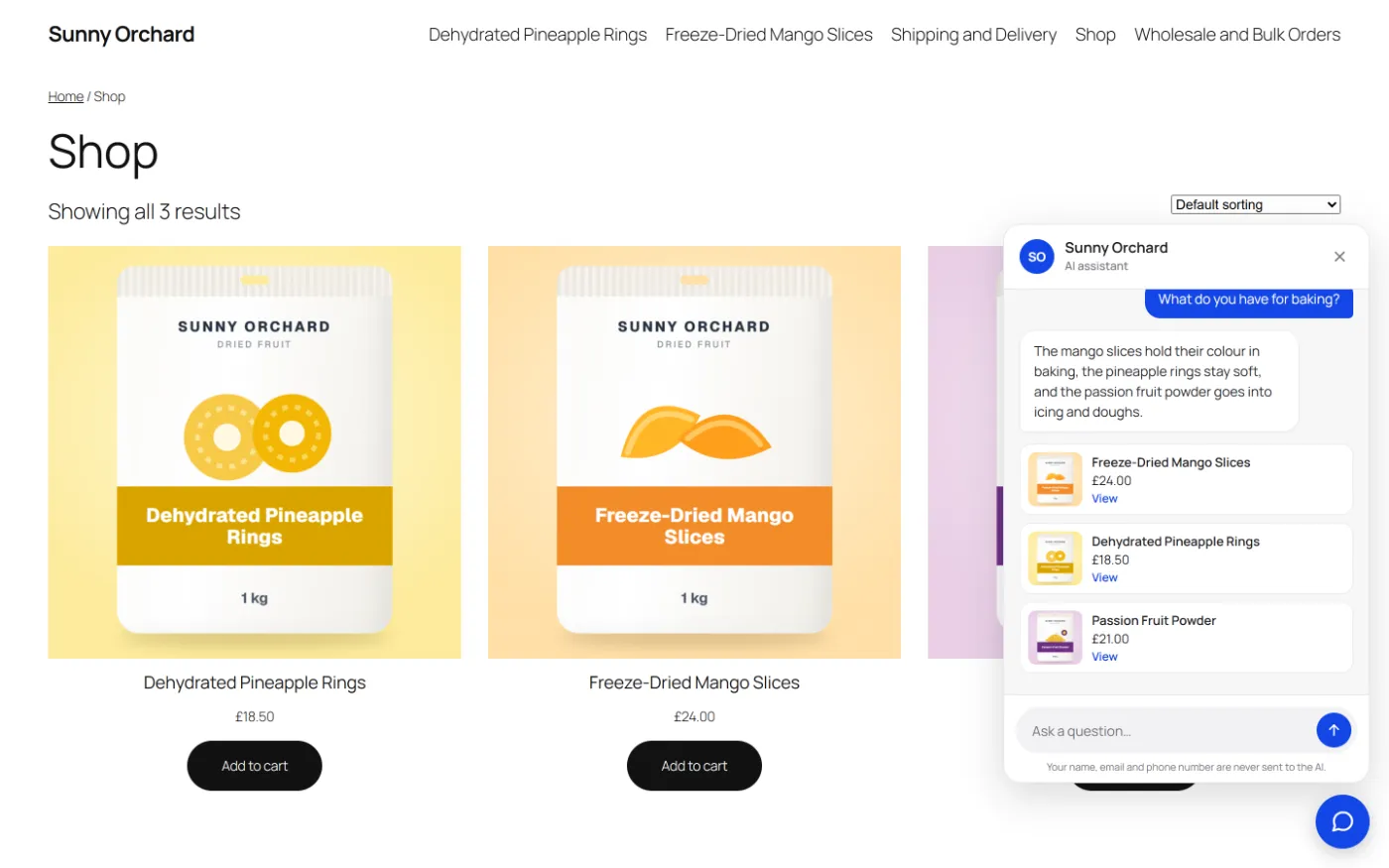
HolaReply for WooCommerce
How it works for you
Shoppers ask about sizes, materials, stock, delivery and returns, often at night and in their own language. HolaReply answers from your WooCommerce products and store pages, and hands everything it can’t answer to your team.
It reads each product as a signed-out shopper sees it: the price your shop displays, SKU, category, visible attributes, weight, stock or back-order status and the short description. So a trade price shown only to logged-in customers is never quoted by the assistant.
What you get
The details.
Product answers from your catalogue →
Price as displayed, SKU, attributes, weight, stock status and description.
Store pages too →
Delivery, returns, payment and FAQ pages, which answer many of the questions shoppers ask.
Discounts stay with your team →
Lock discount codes, custom orders and allergy questions for a person.
Leads from buying questions →
Quote, bulk or wholesale questions ask for an email at the right moment.
Every language →
Shoppers get answers in their language from your English catalogue.
Product cards →
Up to three products under an answer: picture, name, price and a link. Pro adds stock and sale prices.
How it works
Three steps.
Install and choose your AI
Install the free WordPress plugin and add a Google Gemini, OpenAI or Anthropic Claude key, or HolaReply AI credits. On Gemini, turn billing on for a live store: Google requires it if you sell to the EU, UK or Switzerland.
Index products and store pages
Products, plus delivery, returns, payment and FAQ pages.
Lock the risky topics and test
Discount codes, custom orders, allergy advice. Then ask it like a shopper on your phone.
Honest limits
What it doesn’t do.
HolaReply doesn’t look up orders or add products to the cart; it answers from your store and passes order problems to your team. If you need checkout inside the chat, our guide compares plugins that do.
Questions
Asked about HolaReply for WooCommerce.
Does it see live prices and stock?
It indexes the price your shop shows a signed-out visitor and the stock or back-order status, and re-indexes a product when you edit it.
Will it quote trade or wholesale prices?
No. It reads prices as a guest, so prices shown only to logged-in trade customers are never quoted. Lock “prices” if you want every price question to go to a person.
Can it tell customers where their order is?
No. It answers from your delivery and returns pages and hands order problems to your team.
Does it work with WooCommerce wholesale sites?
Yes. See our guide to AI chatbots for wholesale websites.
What does it need?
WordPress 6.6 or later, PHP 8.0 or later and WooCommerce. The plugin and product cards are free; stock on the cards and the Sales Desk for your team are part of Pro.
What does it cost?
Free with your own Gemini key, about $1.70 per 1,000 answers with Gemini Flash in AI usage. Pro, with the Sales Desk, is from $79, paid once.
Guides and comparisons
Read before you choose.
Best AI chatbots for WooCommerce →
What shoppers ask, what a WooCommerce chatbot can do with your catalogue, and 9 options with real prices.
AI chatbot for wholesale →
Answer trade buyers around the clock, and send every price, quote and MOQ question to sales.
Ecommerce chatbot examples →
What big retailers’ AI assistants do, the results they published, and the lessons a small shop can copy.
Amaya chatbot alternative →
Amaya $49 a year, HolaReply from $79 paid once. What each includes, where Amaya is ahead, and where HolaReply is.
WoowBot alternative →
Cart and order tracking vs accurate answers, locked topics and a team inbox. Which fits your store.