

Works today on WordPress, WooCommerce & any website · Shopify coming soon
The report
What the chat did while you were closed.
Switch between the parts of the report. It is worked out from the chats themselves, with no tracking scripts.
Open or closed
Answers given while you were open, and while you were closed
Busiest hours
Questions by hour of the day
Languages
Share of conversations by language, in %
Why it matters
While you were closed: the problem it solves.
Most questions do not arrive between nine and five. They come in the evening, at the weekend, when nobody is there to answer — and a visitor who gets no answer buys somewhere else.
HolaReply shows exactly what it did in those hours: the questions it answered and the enquiries it kept for your team, so you can see what the assistant is worth.
How it works
Three steps.
Set your opening hours
In Settings, give each weekday its hours, or switch a day off. Your weekend is whatever days you are closed: Saturday and Sunday, or Friday and Saturday.
It counts as it works
Every answer and every enquiry is already recorded on your own site, with the time it happened.
See it on the Overview
For the last 7, 30 or 90 days: answers and enquiries while you were closed, what happened on your closed days, and when people ask. On Shopify it is on the app’s Home in your Shopify admin, and in depth in the Desk (Pro).
What’s included
The details.
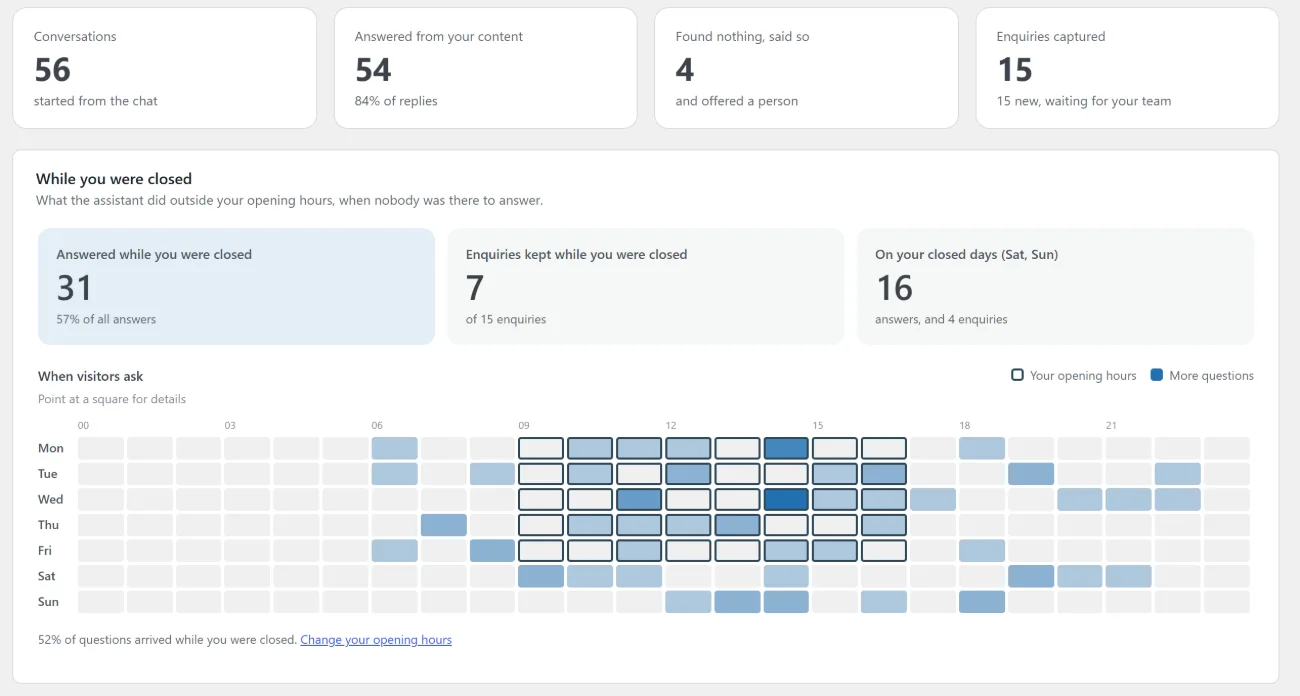
Answered while you were closed
How many questions the assistant answered outside your hours, and what share of all its answers that is.
Enquiries kept while you were closed
Visitors who left their details for your team when nobody was there — leads that would otherwise have gone elsewhere.
Your closed days
Answers and enquiries on the days you do not open, wherever your weekend falls.
When visitors ask
A week drawn hour by hour, the busier hours darker and your opening hours outlined, so you can see when to be available.
Hours past midnight
A bar or shop open 18:00 to 02:00 is counted correctly.
No tracking scripts
Worked out from the chats themselves: on WordPress in your own database, on Shopify in HolaReply Cloud, where the store’s chats are kept. Nothing else is collected.
Questions
Questions about After-Hours AI Chatbot Analytics.
Where do I see it?
On WordPress: on the Overview in wp-admin and in the Sales Desk’s Manage area, in every version. On Shopify: on the app’s Home in your Shopify admin, on every plan, in your store’s time zone; with Pro, the Desk’s Overview adds what to do next and an hour card for every hour, and its Reports go into business impact, leads and sales, AI answers and team speed.
Can my weekend be Friday and Saturday?
Yes. Any day you switch off in your opening hours counts as a closed day.
Is any visitor data sent anywhere for this?
No tracking scripts are added. On WordPress the numbers come from your own database and stay there; on Shopify they are worked out where the chats are kept, in HolaReply Cloud.
Can I get it by email?
Yes, with Pro: a weekly summary on the day and at the time you choose, with these numbers and the questions nobody could answer. On Shopify, the Business impact report can also come by email on the 1st of each month, and the Team and support speed report shows response times.
Read more
Guides and comparisons.
A chatbot for lead generation: capture the leads your website is losing
When to ask for an email, what your team should receive, how fast to reply, and consent, with the real research.
Guide8 ecommerce chatbot examples with real, published results, and what small shops can copy
What big retailers’ AI assistants do, the results they published, and the lessons a small shop can copy.
GuideAn AI chatbot for a small business: what it can do, what it costs, and how to avoid the traps
What customers expect, what a small-business chatbot should and shouldn’t do, real costs, and an afternoon setup plan.